Software
LS-DYNA
Features
WinSuite
Optimization
LS-OPT
LS-TaSC
Pre-Postprocessing
LS-PrePost
DYNAmore ECO SYSTEM
Ansys Forming
Models
Side Dummy Models
Frontal Dummy Models
From Humanetics
From LST LLC
Rear Dummy Model
Child Dummy Models
Pedestrian Impactors
Human Body Model
Barrier Models
Material Models
Material Competence Center
Material Cards
Material Selector
Other Models
Knowledge
Knowledge Base
Training
Ansys Learning Hub
Ansys Innovation Courses
Downloads
Conference Papers
Manuals
Release Notes
Presentations
Aerospace Working Group
Support
Contact Us
Tutorial 6: Page 12
Home
»
Knowledge
»
LS-Prepost
»
Tutorials
»
Extended Tutorials
»
Tutorial 6
»
Tutorial 6: Page 12
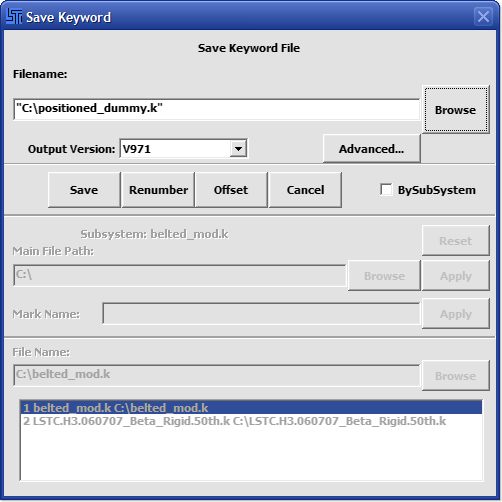
12. Save the model
File → Save Keyword As…
enter Filename: positioned_dummy.k
click
Save
(see Figure 16)
Figure 16
If the preceding steps were followed correctly, your input file should look like this:
positioned_dummy.k
Table of Contents
TUTORIAL 6: PAGE 12